
Terraform tells you what it built. It doesn’t tell you what happened to it afterward.
Six months after a clean apply, the server isn’t quite the one Terraform created. Someone turned on root SSH login during an outage and never turned it off. A security baseline moved. The team that owned the box has been reorganized. A plan won’t show any of it, because Terraform can only compare what sits in its own configuration and state.
Terraform governance starts after the apply
Here’s what Terraform declares for one server. It’s HCL, the language Terraform uses to describe the infrastructure you want. This block asks for a single server and labels it with its owner.
resource "aws_instance" "web" {
  ami           = "ami-0abc1234"
  instance_type = "t3.micro"

  tags = {
    Owner = "platform-team"
  }
}
In plain English, this tells Terraform to create one server of this type and tag it with the team that owns it. Once the server exists, Terraform’s job is done. It doesn’t watch how the server is configured afterward.
During an outage, a responder changes an SSH setting directly on the server. The service recovers, but the change never makes it back into Terraform. The next plan still looks clean because the cloud resource itself has not changed. The problem only appears when the running system is checked against policy.
Where Chef 360 fits
Chef 360 gives teams one place to see enrolled systems, run approved jobs against them, and check them against policy. It sits next to Terraform or OpenTofu, so nobody has to give up the provisioning workflow they already trust.
The line between the two matters. Terraform owns the resource definitions. Chef 360 owns whatever you assign to it on the node: configuration, compliance checks and Day-2 jobs. Pick one owner for each setting. Two tools managing the same value is how you end up arguing at 2 a.m.
| Terraform / OpenTofu | Chef 360 | |
| What it does | Provisions cloud and infrastructure resources from code | Runs jobs, checks policy and keeps results for enrolled systems |
| When it runs | When the infrastructure definition changes | On demand, on a schedule or as policy is enforced |
| What you keep | Plan output, state and pipeline history | Job results, node status and compliance findings |
See it in action
Picture a platform team running an internet-facing app on AWS, built with Terraform. During an outage a responder switches on root SSH login to get back in. The fix works. It also breaks a security control, and nobody writes it down.
The 2 a.m. hotfix: from drift to proof
A clean Terraform apply. One emergency change. A control left broken after the incident.
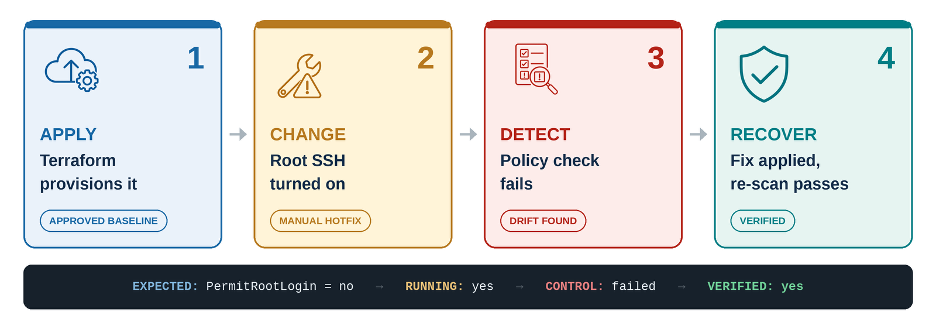
Steps 3 and 4 are where Chef 360 comes in. Enrolled nodes pull Chef InSpec profiles and run the scan. When a control fails, an approved job applies the fix and the same scan runs again to confirm.
Here is the control behind step 3. The same one confirms the fix.
control "ssh-root-login" do
  title "Root cannot log in over SSH"

  describe sshd_config do
    its("PermitRootLogin") { should cmp "no" }
  end
end
In plain English, this InSpec code says: look at the server's SSH settings. If root login is set to “no”, the check passes. If someone changed it during an incident, the check fails. After the fix, the same check runs again to confirm.
Where this tends to bite
Drift is the obvious one. A setting gets changed by hand, and nobody notices until something breaks.
Audits are the other. A control fails, the scan result lives in one tool, the asset list in another and the owner in an old spreadsheet. Someone has to stitch them together before anyone can fix anything. With Chef 360 you can see which enrolled systems fail the control and whether it’s one box or fifty. If ownership details like Service or Environment are on the node, you also know who to call.
Rollouts need the same care. You wouldn’t push one baseline fix to dev, staging and prod at once. Chef 360 can target nodes by query or saved list and run jobs sequentially, in parallel or in batches.
Frequently asked questions
Does Chef 360 replace Terraform or OpenTofu?
No. Terraform and OpenTofu provision infrastructure. Chef 360 manages what’s running once it exists.
How do new instances join Chef 360?
Chef 360 supports bulk, cookbook-based, single-node and self-enrollment. Which one fits depends on your image pipeline, networking and credential setup.
How does this help with drift?
Terraform can spot differences in the resources it manages. Chef 360 covers the node itself: configuration, compliance checks and approved fixes for the controls you assign to it.
Keep Reading
- Chef 360 governance blog
- Chef 360 node enrolment methods (bulk, cookbook-based, single-node and self-enrolment)
- Chef Inspec sshd_config resource